

meta data for this page
This is an old revision of the document!
2D Primitives
‘2D’ stands for two (2) dimensional. A 2D primitive is any shape that has two dimensions, which are width and length (or X and Y.) The 2D dimensional shapes have no thickness (Although, JSCAD shows a very thin shape.)
One way of thinking about 2D shapes is anything that lays flat on a piece of paper, such as drawing a circle or a square.
The mathematical study of 2D shapes and dimensions is called plane geometry.
Resolution of Shapes
All rounded shapes have a resolution option which controls tesselation. If resolution is set to 8, then 8 polygons are used to create 360 degrees of revolution.
This allows each design to control the amount of detail present, but beware that calculations and rendering time will also increase. For example, the number of polygons increases quickly with each increase of the resolution for circles.
EXAMPLE
If the resolution option is omitted, the following resolution is used.
- CSG.defaultResolution2D = 32
OpenSCAD like functions support the fn parameter, which is the same as resolution.
Rectangle
A two dimensional shape made with four straight sides where all interior angles are right angles (90°).

Learn about rectangles at MathIsFun.com
The size specifies the size across X and Y axis. Rectangles can be created at a requested center.
Defaults:
- size : [2, 2]
- center : [0, 0]
const { rectangle } = require('@jscad/modeling').primitives

const myshape = rectangle({size: [3, 4]})
const myshape = rectangle({size: [3, 4], center: [5, 5]})
Square
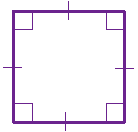
The specialized square primitive also exists, but requires only one number value for all sides.
Defaults:
- size : 2
- center : [0, 0]
const { square } = require('@jscad/modeling').primitives

const myshape = square({size: 3})
const myshape = square({size: 3, center: [5, 5]})
Rounded Rectangle
Rounded rectangles can be created by specifying a roundRadius for the corners.
Defaults:
- size : [2, 2]
- center : [0, 0]
- roundedRadius: 0.2
- segments: 32
const { roundedRectangle } = require('@jscad/modeling').primitives

const myshape = roundedRectangle({size: [10, 20], roundRadius: 2})
const myshape = roundedRectangle({size: [10, 20], roundRadius: 2, center: [5, 5], segments: 64})
Polygon
A two dimensional shape with straight sides, and the shape is “closed” (all the sides connect up).
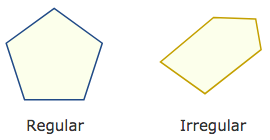

Learn about polygons at MathIsFun.com
NOTE: The ordering of points is VERY IMPORTANT. If the polygon is going to be extruded then the points must be in counter-clockwise order, otherwise the faces of the object will be facing inwards. See Orientation.
HINT: Polygons should have a positive area.
The following show examples of creating polygons from a list of points.
Defaults:
- empty
const { polygon } = require('@jscad/modeling').primitives

const myshape = polygon({ points: [ [0,0],[3,0],[3,3] ] })